Start with your knowledge.
Bring your approved documents or a finished script. Everything starts with material you trust.
See how it works
Turn approved material into on-brand training video.
With source references you can review.
14 days. About 10 video minutes. No credit card.
Bring your approved documents or a finished script. Everything starts with material you trust.
See how it worksFollow each script line back to its source. Review it. Refine it. Make it yours.
See how it worksYour words become scenes in your brand look. Ready as video, captions and a transcript.
See how it worksFor teams who answer for
what their training says.
A new video means a production cycle. A correction means doing it again. And the quick “prompt to video” tools make things up, ignore your brand and cannot say where a claim came from.
Give EAiDEO an approved script or your source documents. You get an explainer video in your brand look, a captions file and a transcript. You decide how much to check along the way.
Try it with your materialEach line of a script made from your documents points to the section it came from. A line your documents do not back is marked “Needs a source”, not hidden.
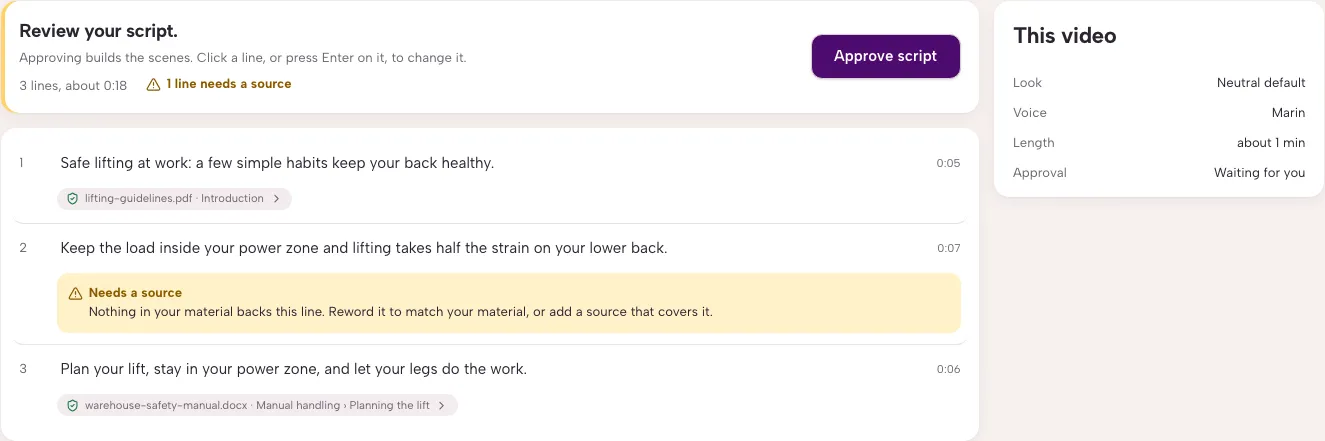
Your source. Your wording. Your approval.
You choose the look. Colours, type and motion stay the same in every video. The software never picks them.
Edit a line, try another visual for one scene, re-record one line. Press Update video and only what changed is made again.
Four steps, from script to video.
Explore the process below.
Paste your script or drop a PDF, Word, Markdown or text file. Pick a brand look. Choose “Just make it” or “Let me check first”.
Try it with your scriptA finished script. A document. Your next lesson.
Read it line by line. Change any line. A long script is split into parts of about five minutes, and you see the split before anything runs.
Try it with your scriptPlan your lift, stay in your power zone, and let your legs do the work.
Source: warehouse-safety-manual.docxWatch the scenes play in your look before the final video is made. Try another visual, re-record a line, or keep a scene as it is.
Try it with your scriptPreview, not the final video
Download the MP4, the captions and the transcript. Come back later, edit, and press Update video.
Try it with your scriptYou choose how much to review.
EAiDEO runs from start to finish. You can still change anything afterwards.
It stops at the script and again at the preview, so you approve both before the video is made.
For regulated teams. An Admin switches it on for the whole workspace. Every video stops for review, and the sources stay visible.
Everything you need to take your approved material from a document to a course video.
MP4 video at 1920×1080, a captions file (WebVTT) and a Markdown transcript with source references and footage credits.
They are not burned into the picture, so you can use them in your LMS or edit them.
A finished script is not summarised. If the import dropped content, it tells you.
Admins set colours, type, motion, logo and tagline once. Every video from the workspace follows.
Choose from candidates or upload your own clip with its licence and credit. A clip with no licence record does not ship.
On-screen text appears as it is spoken.
See where your video is and your place in line. Cancel or retry any time.
Invite colleagues as Admins or Designers. A workspace is visible only to its members.
Training providers and course creators with finished scripts to turn into video.
Compliance and safety training teams, where each claim should trace to an approved source.
Internal learning and development teams with a brand to keep consistent.
Example subjects: nursing exam preparation and workplace safety.
No presenter avatars. On purpose.
A minute is the length of each finished video. Making a video again uses minutes again. Previews and edits are free.
$39/ month
30 video minutes per month
3 seats
$129/ month
120 video minutes per month
10 seats
$349/ month
400 video minutes per month
Unlimited seats
A little more
room to teach.
Minutes and seats
agreed with you.
Free trial: 14 days, about 10 video minutes, no credit card.
Trial videos carry a small “Made with EAiDEO” watermark.
Questions first?
Talk to us
A finished narration script, or your approved documents (PDF, Word, Markdown or text).
When it teaches from your documents, every script line points to the section it came from. A line your documents do not back is marked “Needs a source” so you can fix it or remove it. When you give it a finished script, it keeps your wording and tells you if conversion dropped content.
Yes. You choose a brand look, and Admins can edit its colours, type, motion, logo and tagline. Every video made with it matches.
Yes. Choose “Let me check first”. It stops at the script and at the preview. In compliance mode it always does.
An MP4 video, a captions file (WebVTT) and a transcript. The captions are separate from the picture.
Fix the script or the scene, then press Update video. Only the parts that changed are made again. You edit the source; you do not patch the finished video.
No. EAiDEO makes explainer videos from scenes, text, icons and footage.
The length of each finished video. Making a video again uses minutes again. Previews and edits are free.
If you do not choose a plan, your workspace becomes read-only. You can still view and download your work. Nothing is deleted automatically.

14 days, about 10 video minutes, no credit card.
Start your free trial Log in